
If your Shopify image gallery is not loading while the rest of the page looks fine, the gallery app is almost certainly rendering from a server that is not Shopify's. When that server, or its SSL certificate, fails, the gallery disappears and the theme keeps working, so nobody notices until a customer does. In late summer 2025 this happened to a lot of stores at once. This article explains why a Shopify gallery app can stop showing, how to check what is happening on your own store, what to do about it today, and what to look for so it cannot happen again.
The symptom: an empty space where the gallery used to be
The failure is quiet. There is no error banner in the Shopify admin, no email, and the theme editor still shows the app's section or block. On the live storefront the page simply has a gap, or a heading with nothing under it, or a spinner that never finishes. Because the theme itself is fine, the store owner usually learns about it from a customer or after checking a page for another reason.
That is what merchants using Cozy Image Gallery described in the one- and two-star reviews on its public review page between August and October 2025. Fragments from that page: “SSL Certificate expired a couple of weeks ago and there has been no communication from the developer” (9 September 2025); the outage “left a hole in our website that we did not know existed for weeks” (3 September 2025); and “Firefox gives security errors” (17 September 2025). We are quoting the reviews rather than summarising them, so read the page and judge for yourself. The app is still listed on the Shopify App Store, with a 3.1-star rating at the time of writing (28 September 2026).
The point of this article is not one app. The same failure can hit any gallery, slider or Instagram-feed app that is built the same way, and there are many of them.
Why it happens: the gallery lives on someone else's server
A large share of gallery apps work through an embed snippet. You (or the app, during installation) add a few lines to the theme: a <script> tag or an <iframe> that points at the developer's domain. When a shopper opens the page, the browser fetches the gallery's JavaScript, its stylesheet, its configuration and often the images themselves from that domain. Shopify only delivers the placeholder; the developer's infrastructure delivers the gallery.
That design has three single points of failure that a theme section does not have. First, hosting: if the developer's server is down, unpaid or overloaded, the request fails and the browser draws nothing. Second, the TLS certificate: browsers refuse to load scripts from a host whose certificate has expired or does not match the domain, and they do it silently for sub-resources, so the visitor sees a blank area rather than a warning. Third, DNS and domain renewal: if the domain lapses, every embed on every store breaks at once. None of these are things Shopify monitors, because none of them belong to Shopify.
The security-error detail is worth understanding. Chrome, Safari and Firefox all block a script served with an expired certificate, but they differ in how they cache certificate decisions and how strictly they treat mixed content, which is why the same gallery can appear on one computer and vanish on another. A merchant who has clicked through a certificate warning on their own machine may not see a problem that every customer sees.
How to diagnose it in five minutes
- Open the affected page in a private browsing window so nothing is cached, press F12 (or Cmd-Option-I on a Mac) to open the developer tools, select the Console tab and reload. Look for lines mentioning ERR_CERT_DATE_INVALID, NET::ERR_CERT_COMMON_NAME_INVALID, SEC_ERROR_EXPIRED_CERTIFICATE (Firefox), “blocked:mixed-content” or “Failed to load resource”. Any of these next to a URL that is not your domain or cdn.shopify.com points at the app's host.
- Switch to the Network tab, reload again and sort by domain. Everything that is not your store domain or cdn.shopify.com is a third-party dependency. Click a failing request (shown in red) and copy its URL into a new tab: if you get a certificate warning or a connection error, you have confirmed the cause.
- While you are there, note where the images load from. If the gallery's photos come from cdn.shopify.com, your originals are in your store's Files. If they come from the app's domain, the app is hosting them, and you should read Who owns your gallery images? before you do anything else.
- In your Shopify admin go to Online Store, Themes, then Edit code on your live theme, and use the search box to look for the app's domain or name. That shows whether it added a snippet to theme.liquid, a section file, or a page template, and tells you what you will need to remove later. Shopify's own uninstall guidance notes that some apps add code to your theme that is not removed when you uninstall them (Uninstalling apps).
- Finally, open the app's Shopify App Store page and sort reviews by most recent. If other merchants are reporting the same thing this week and the developer is not replying, you are looking at an outage, not a configuration problem on your store.
Manual fixes and workarounds for today
Close the hole first. In the theme editor, find the section or block that holds the broken gallery and use the eye icon to hide it, or remove it from the page. If the app injected code into theme.liquid, duplicate the theme before editing so you have a backup, then remove the snippet from the copy and publish the copy. A page with no gallery is better than a page with a broken one.
For a temporary replacement, every Online Store 2.0 theme (Dawn, Sense, Craft, Refresh and most paid themes) ships with Collage, Multicolumn, Slideshow and Image with text sections. They have no lightbox or filtering, but they are rendered by Shopify and will not disappear. Upload your photos through Content, Files, or pick them from Files in the section settings.
Keep evidence. Take dated screenshots of the empty page, the console errors and the app's review page. If you were on a paid plan and want a refund for the period the gallery was down, Shopify's Help Center says to contact the developer through the App Store, and that Shopify follows up after three days if they have not responded (App charges). Do not uninstall until you have recovered your images: the same Help Center page on uninstalling warns that “some apps store data that you can't recover after uninstalling”.
How Snug Gallery is built so this cannot happen
Snug Gallery is a theme app extension, which is Shopify's mechanism for apps that appear on the storefront. Shopify's documentation describes what that gives you: the extension's files are hosted on Shopify's CDN, merchants do not edit theme code, and the block is added from the theme editor like any other section (Theme app extensions). The configuration reference is explicit that “all files inside the assets/ folder are automatically served from Shopify's CDN” (Configure theme app extensions). The block's stylesheet and scripts live in that folder.
The gallery data is not on our servers either. Each gallery is stored as app-owned metaobjects in your own store, and the block's Liquid reads the metaobject and renders the HTML together with the rest of your theme. Photos and videos are uploaded to your store's Files and served from cdn.shopify.com. When a shopper loads a page with a Snug Gallery block, the browser makes no request to beaconwavestudio.com for the gallery to appear. If our servers were switched off tonight, published galleries would still render tomorrow; only the editor in the admin and the customer photo submission form, which posts through our server, would be unavailable.
For completeness, three things on the storefront do reach outside Shopify, all optional and all under your control: the customer photo submission form posts through Shopify's app proxy to our server only when a visitor submits a photo; a video added by URL loads from YouTube or Vimeo when it is played; and the Pinterest save button is a plain link to pinterest.com. None of them is needed to draw the gallery.
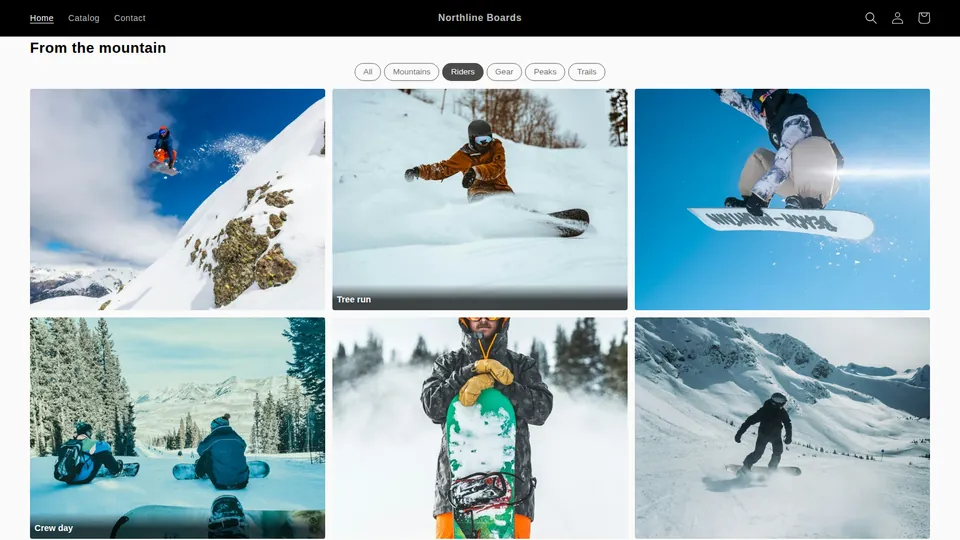
The screenshot below is a gallery on our development store. Open the same page in your own browser's Network tab and every request for the gallery goes to the store's domain or to cdn.shopify.com. Setting it up takes a few minutes and no code; the walkthrough is in How to add a photo gallery to a Shopify store (no code).
Questions to ask before installing any gallery app
Three questions separate galleries that can vanish from galleries that cannot. Where do my images live: in my store's Files, or on the developer's servers? How does the gallery reach the page: as an app block I add in the theme editor, or as a snippet pasted into theme code? And what happens on my storefront if the developer's server is unreachable? An honest listing or support page answers all three. If the answers are vague, treat the app as a dependency you are adding to every page it appears on.
For a broader checklist that covers support responsiveness, review replies and how to read a listing's history, see How to tell if a Shopify app is abandoned before you install it.
Frequently asked questions
Why does my gallery show in Chrome but not in Firefox or on my phone?
Browsers cache certificate decisions differently, and a computer where someone once clicked through a certificate warning may keep trusting an expired certificate that every other device rejects. Test in a private window on a device you have not used for the store; that is what your customers see.
Can Shopify Support fix a third-party gallery app that stopped working?
No. Shopify Support can help with charges on your Shopify bill and will follow up with a developer about a refund request, as described on the Help Center's App charges page, but it cannot repair or host another company's code. The fix has to come from the developer, or from replacing the app.
Will removing the app's snippet break my theme?
Removing a script tag or section leaves an empty area but does not affect the rest of the theme. Duplicate the theme first, edit the copy, preview it, then publish. If the app added a section file, deleting the block from the page in the theme editor is enough.
Does Snug Gallery load anything from your servers on my storefront?
Not to render a gallery. The block's assets are on Shopify's CDN, the gallery data is in metaobjects in your store and the media is in your Files. The only requests that reach us are customer photo submissions, if you turn that feature on, sent through Shopify's app proxy when a visitor submits.
How can I tell whether an app is a theme app extension before I install it?
After installing, open the theme editor and click Add block or Add section: a theme app extension appears under Apps. An app that asks you to paste code, or that edits theme.liquid for you, is not one. Shopify's documentation on theme app extensions states that merchants using them do not need to manually edit their theme code.
More guides
- How to add a photo gallery to a Shopify store (no code)
- How to make a shoppable lookbook on Shopify
- Cozy Image Gallery alternative: a 20-minute migration
- Who owns your gallery images? Shopify Files vs app-hosted
- Shopify app still charging after uninstall? What to do
- How to tell if a Shopify app is abandoned: a checklist
- Masonry, grid, carousel or collage: Shopify gallery layouts
- Accessible Shopify image gallery: an EAA-era checklist
- Instagram feed broken on Shopify? Own your customer photos
- Shopify video gallery: upload, YouTube or Vimeo?
- Protecting gallery images on Shopify: right-click blocking
- Does a photo gallery slow down your Shopify store?
- Shopify gallery images in Google Images: an SEO guide
- Shopify Canvas and Snug Gallery: what works today
- Build a Shopify gift guide page that is not a collection
- Replaced an image in Shopify but the old one still shows?